How to do aggregations in Salesforce Marketing Cloud? - DESelect Blog
Would you like to be able to find the number of orders each customer has made in a certain period of time? Or calculate the average order value for each customer? Or maybe you want to count the number of emails sent to each subscriber in the last 30 days? All that and more is possible with the aggregation functionality in Salesforce Marketing Cloud.
In this article, we will explain how to use aggregations in Salesforce Marketing Cloud (SFMC) using SQL and DESelect.
How to use aggregations in SFMC using SQL
SQL is great at aggregating data the way you might in a pivot table in Excel. The functions are similar to what you’ll find in Excel or certain analytical tools. For instance, The GROUP BY statement groups rows that have the same values as summary rows, like “find the number of customers in each country”.
The GROUP BY statement is often used with aggregate functions (COUNT(), MAX(), MIN(), SUM(), AVG()), to group the result-set by one or more columns. Here you can find a brief explanation of what each function means:
- AVG – calculates the average of a set of values
- COUNT – counts rows in a specified table or view
- MIN – gets the minimum value in a set of values
- MAX – gets the maximum value in a set of values
- SUM – calculates the sum of values.
In this article, we’re going to dig deeper into the COUNT aggregation that allows you to do a count on a data extension or data view and store the results in your target data extension.
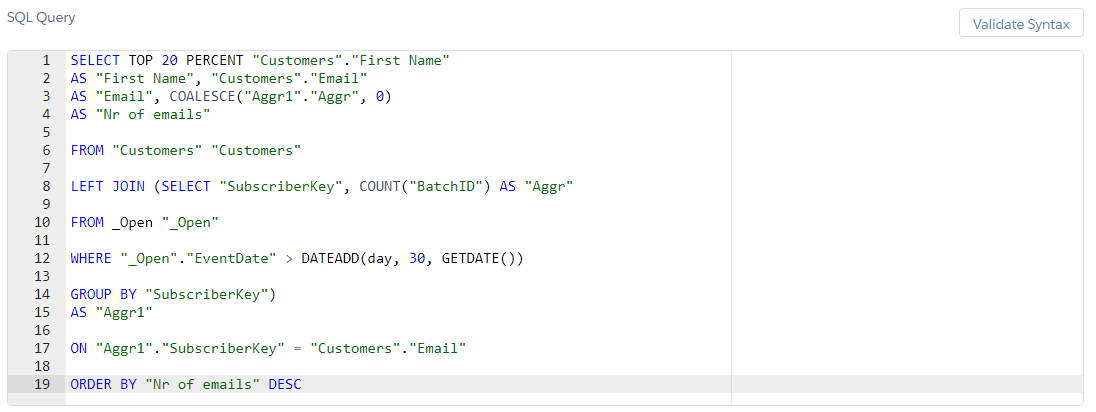
In the scenario we’re going to demonstrate, we’d like to know the number of times each subscriber has opened an email in the last 30 days. On top of that, we’d also like to limit the result to the first 20% of subscribers.
Here’s how the SQL query for the following scenario will look.
(SQL query using Aggregations)
In our example, we’re using the Customers data extension along with the data view _Open. Normally, an aggregation is only a part of the segmentation a marketer has to perform. However, for non-technical marketers it can sound like a challenge. Fortunately, there are alternatives to writing SQL in SFMC if you want to use aggregations… like DESelect!
How to use aggregations in SFMC using DESelect
In the video below you can find a step-by-step guide to using aggregations in DESelect.
For convenience, DESelect offers different screens depending on the level of the marketer’s maturity. For instance, if you don’t know how your data model is set up exactly, you can use the ‘Basic’ screen, where the relations between your data extensions are already pre-defined. In the video, for example we’re using this screen to create an aggregation. However, if you are more confident with your data model, you can use the advanced screen. You can read more about how to create a segment using the advanced aggregation screen here.
If you’d like to book a live demo to see how DESelect avoids the need for code in your advanced segmentation, one of our experts would love to help you.
Conclusion
In this article, we explained how to use aggregations in Salesforce Marketing Cloud using SQL and the no-code alternative, DESelect. If you want to see DESelect live and leverage aggregations with an easy drag-and-drop, book a demo with one of our experts.
- How to use aggregations in SFMC using SQL
- How to use aggregations in SFMC using DESelect
- Conclusion
Latest Articles
-
What Is Salesforce Sales Cloud? (And How It Really Works in 2026)
What Is Salesforce Sales Cloud? (And How It Really Works in 2026) Salesforce Sales Cloud is Salesforce’s flagship CRM platform for managing the entire sales process from tracking leads and contacts through to closing deals and forecasting revenue. At its core, it’s a cloud-based system that brings together Leads, Accounts, Contacts, Opportunities, Activities, and AI-driven […]March 3, 2026WhoId and WhatId in Salesforce: Clear Definitions, Examples and SOQL Usage
WhoId and WhatId in Salesforce: Clear Definitions, Examples and SOQL Usage If you have ever wondered why a Task you created does not appear where you expected it in Salesforce, the answer often comes down to two small fields: WhoId and WhatId. These fields play a crucial role in linking activities to the correct records, […]March 3, 2026Salesforce Backup Solutions: Why They Matter, How They Work, And What To Choose
Salesforce Backup Solutions: Why They Matter, How They Work, And What To Choose Introduction: “Salesforce Already Backs Up My Data… Don’t They?” One of the most common assumptions we hear from businesses using Salesforce is that their data is automatically protected. After all, Salesforce is a massive enterprise platform trusted by millions of organisations worldwide. […]March 3, 2026Salesforce Health Cloud Explained: Managing Patient Data at Scale
Salesforce Health Cloud Explained: Managing Patient Data at Scale Managing patient data across fragmented systems is one of the most persistent challenges facing healthcare providers today. Electronic health records sit in silos. Claims data lives in separate platforms. Patient engagement happens through disconnected channels. The result is a fractured view of the patient that undermines […]January 30, 2026Join our newsletter to receive updates and helpful SFMC guides.