Manual contact creation in Contact Builder
Imagine you’re testing an email for a future campaign and would like to send a test email to a test contact. At this point, you might wonder if it is possible to create contacts in Contact Builder manually. Yes, you can. When you create a data extension in Contact Builder, you can later manually add records to that data extension. It’s a quick way to make fake contacts that you can use for future tests. Performing such an exercise is one of the main (sometimes the only) reasons that non-admins need access to Contact Builder.
Import activities in Contact Builder
You use import activities to add new data to the extensions in Contact Builder. There are several opportunities to import data. For instance, if your file exceeds 20 MB, you must use the FTP option. Alternatively, you don’t need to rely on FTP servers if your files are smaller. You can choose a CSV file from your computer or data from an existing data extension.
You can find more instructions on how to use import activities in SFMC here.
How to add a CSV file to a data extension in Contact Builder
Adding new data in a data extension in Contact Builder is similar to the one in Email Studio. Watch this video to learn how to import a CSV file with contact information in a data extension.
Deleting contacts in Salesforce Marketing Cloud
Why is contact deletion significant?
At some point, your customers may request that you delete their personal information from your records which you are obliged to do in compliance with GDPR or CCPA regulations. Hence will need to know how to delete the relevant contact information in Salesforce Marketing Cloud, which also happens in Contact Builder.
How to delete contacts in Contact Builder?
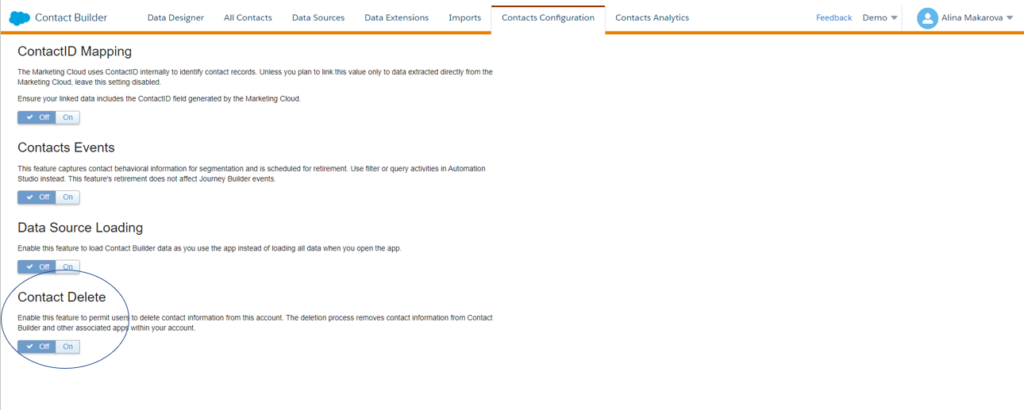
Firstly, you need to enable the contact deletion feature. You can do it by accessing the Contacts Configuration tab.
(‘Contacts Configuration’ tab in Contact Builder.)
Different accounts require different approaches for contact deletion. For example, if you have an Enterprise 2.0 account, the enablement occurs at the parent account level for the entire organization. It is important to note all contact deletion processes are final, and Marketing Cloud cannot restore deleted contact information.
What steps do you need to take to delete contacts in Contact Builder?
- There is a two-day default suppression period during which the contact information remains in your account, but you cannot view or access it. You can change the suppression period if you like.
- Then manually delete the Contact. For instance, you can delete a contact from the All Contacts tab.
- Marketing Cloud will then remove the contact from your account, which is final.
Marketing Cloud deletes contact information from lists and sendable data extensions. You can delete up to one million records, and the process does not apply to non-sendable data extensions not included in a population via Data Designer. You are responsible for deleting applicable information from those sources on your own.
Contact deletion best practices: Use Contact Key or Contact ID values to delete contacts.
If you linked multiple Subscriber Key or Contact Key values to the same contact, perform the Contact Delete process for all values.
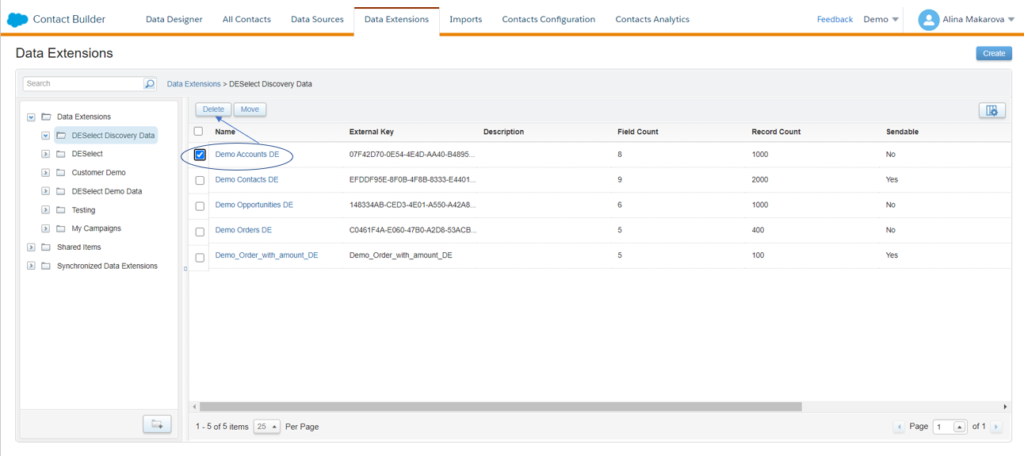
Apart from the individual contact deletion, you can also delete all contacts in a given data extension. To do that, navigate the data extensions tab and select a data extension containing contacts you want to delete. Then click Delete.
If you want to export all contacts, create a support ticket to extract All Contacts to a data extension. They can include the attributes that belong to the central Contacts table (system attributes). You can then use this data extension for queries to isolate contacts you want to delete. Make sure to clear the All Contacts data extension, give it a data retention policy or make it sendable if you’re planning to clear out all contact data.
Conclusion
Adding and deleting contacts in Contact Builder is a relatively simple process. Take into account the differences between account types and always stay on top of the data to ensure compliance best practices.
Companies are spending countless marketing dollars and hours on collecting and managing data—often with little to no idea of how best to store or utilize it. Inefficiencies have become the norm, keeping companies from unlocking their full potential.
We created the DESelect Segment tool to help marketers, campaign managers, and CRM admins streamline this process, saving time, money, and unnecessary stress.
So marketing leaders see more return from their campaigns because they are better segmented and more personalized.
Ready to see what no code SFMC audience segmentation can do for your marketing team? Our team is ready to help you start your segmentation journey. Get a no pressure demo of DESelect Segment here.
Latest Articles
-
What Is Salesforce Sales Cloud? (And How It Really Works in 2026)
What Is Salesforce Sales Cloud? (And How It Really Works in 2026) Salesforce Sales Cloud is Salesforce’s flagship CRM platform for managing the entire sales process from tracking leads and contacts through to closing deals and forecasting revenue. At its core, it’s a cloud-based system that brings together Leads, Accounts, Contacts, Opportunities, Activities, and AI-driven […]March 3, 2026WhoId and WhatId in Salesforce: Clear Definitions, Examples and SOQL Usage
WhoId and WhatId in Salesforce: Clear Definitions, Examples and SOQL Usage If you have ever wondered why a Task you created does not appear where you expected it in Salesforce, the answer often comes down to two small fields: WhoId and WhatId. These fields play a crucial role in linking activities to the correct records, […]March 3, 2026Salesforce Backup Solutions: Why They Matter, How They Work, And What To Choose
Salesforce Backup Solutions: Why They Matter, How They Work, And What To Choose Introduction: “Salesforce Already Backs Up My Data… Don’t They?” One of the most common assumptions we hear from businesses using Salesforce is that their data is automatically protected. After all, Salesforce is a massive enterprise platform trusted by millions of organisations worldwide. […]March 3, 2026Salesforce Health Cloud Explained: Managing Patient Data at Scale
Salesforce Health Cloud Explained: Managing Patient Data at Scale Managing patient data across fragmented systems is one of the most persistent challenges facing healthcare providers today. Electronic health records sit in silos. Claims data lives in separate platforms. Patient engagement happens through disconnected channels. The result is a fractured view of the patient that undermines […]January 30, 2026