How to use picklists in Salesforce Marketing Cloud

Picklists you say?

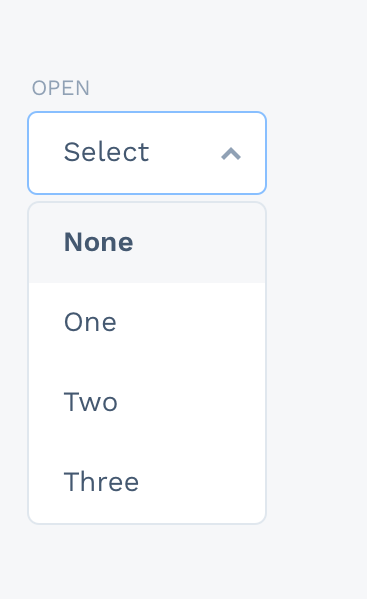
Picklists are basically dropdowns used to let users choose from a series of values. Picklists can help you simplify data entry (time saver) and standardize values (prevent errors). They guide users to the values they need and make things easier. They’re not ideal for long entries, or loads of unique values. However, they can dramatically decrease the time it takes to find the correct value in a field manually.

Picklist example.

How to use picklists in Salesforce Marketing Cloud?

In comparison to Sales or Service Cloud, Salesforce Marketing Cloud doesn’t have out of the box picklist solution. However, using a third-party tool like DESelect can help you benefit from this functionality. 

Picklists are really valuable for segmentation purposes in Salesforce Marketing Cloud and for data management in general. Why? Because they help to standardize the data and limit the threat of making mistakes while filling in the information manually. You create picklists for fields in data extensions. For example, you have a field Country in your data extension (DE) and you want to choose particular countries from this DE. The problem here is that you don’t remember if  ‘United States of America’ or ‘USA’ is set as a value in this field. With picklists, you don’t need to search for it in your data extension manually. 

Moreover, picklists decrease the number of mistakes that a marketer can make when filtering on a data extension. For instance, a chance that a user will accidentally type “US” will not be an option if you have created a picklist for that value

Do you already see how impactful picklists are?

How to create picklists for Salesforce Marketing Cloud using DESelect?

To make it easier for users to filter, DESelect admins can define a picklist for a field, so the user can use a dropdown with the defined values instead of a free input field when working with the field in DESelect.

Let’s create a picklist in DESelect!

In order to create a picklist in DESelect, you need to have admin rights. Then you need to decide which data extension and which field you want to create a picklist for. Our example below is based on the education industry since we would like to create a picklist value for subjects in a Courses data extension. (Of course, the same approach can be used for any field relevant for your industry or company.)

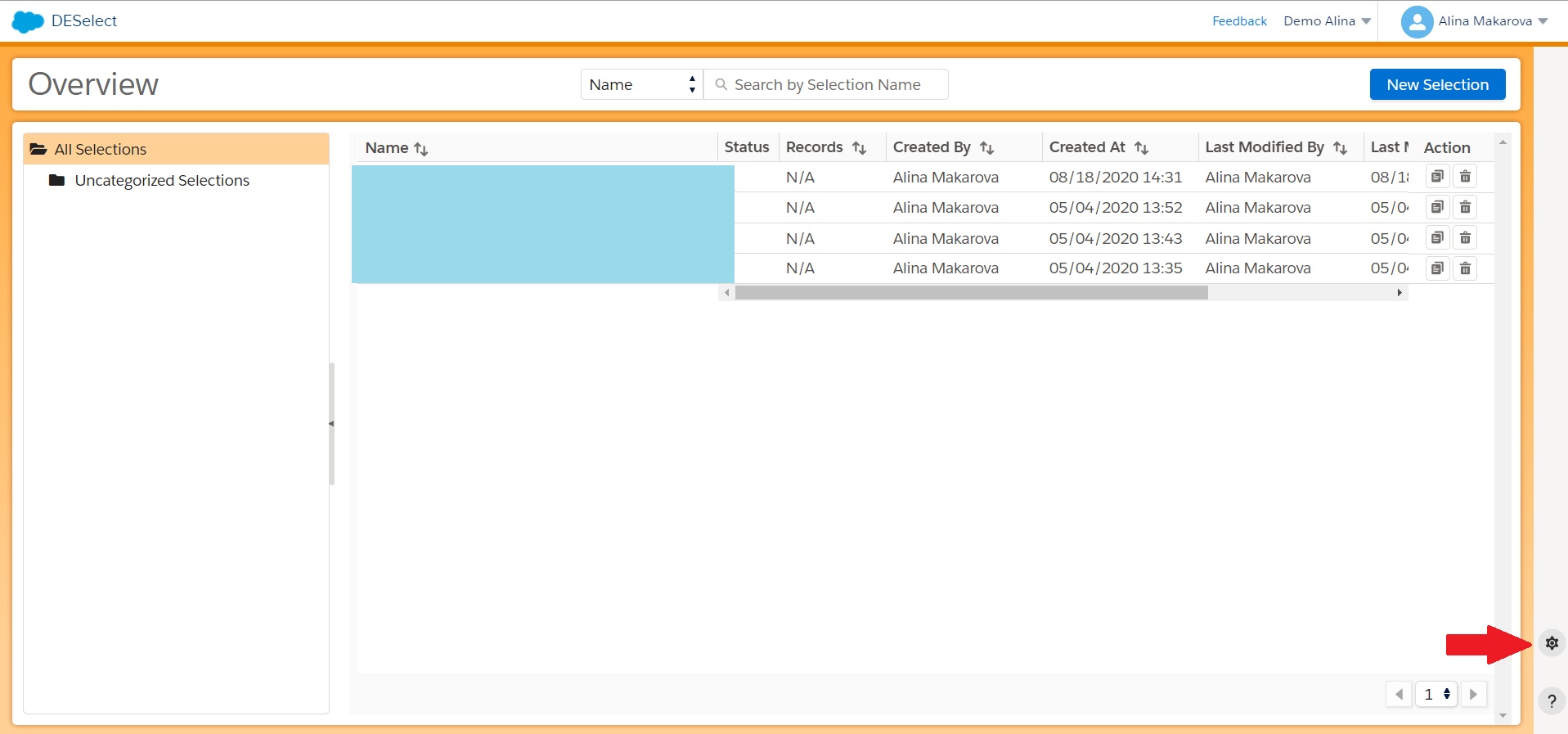
The first step in the process of creating a picklist starts on the overview panel of DESelect. There you need to click on the gear icon in the right corner of the screen.

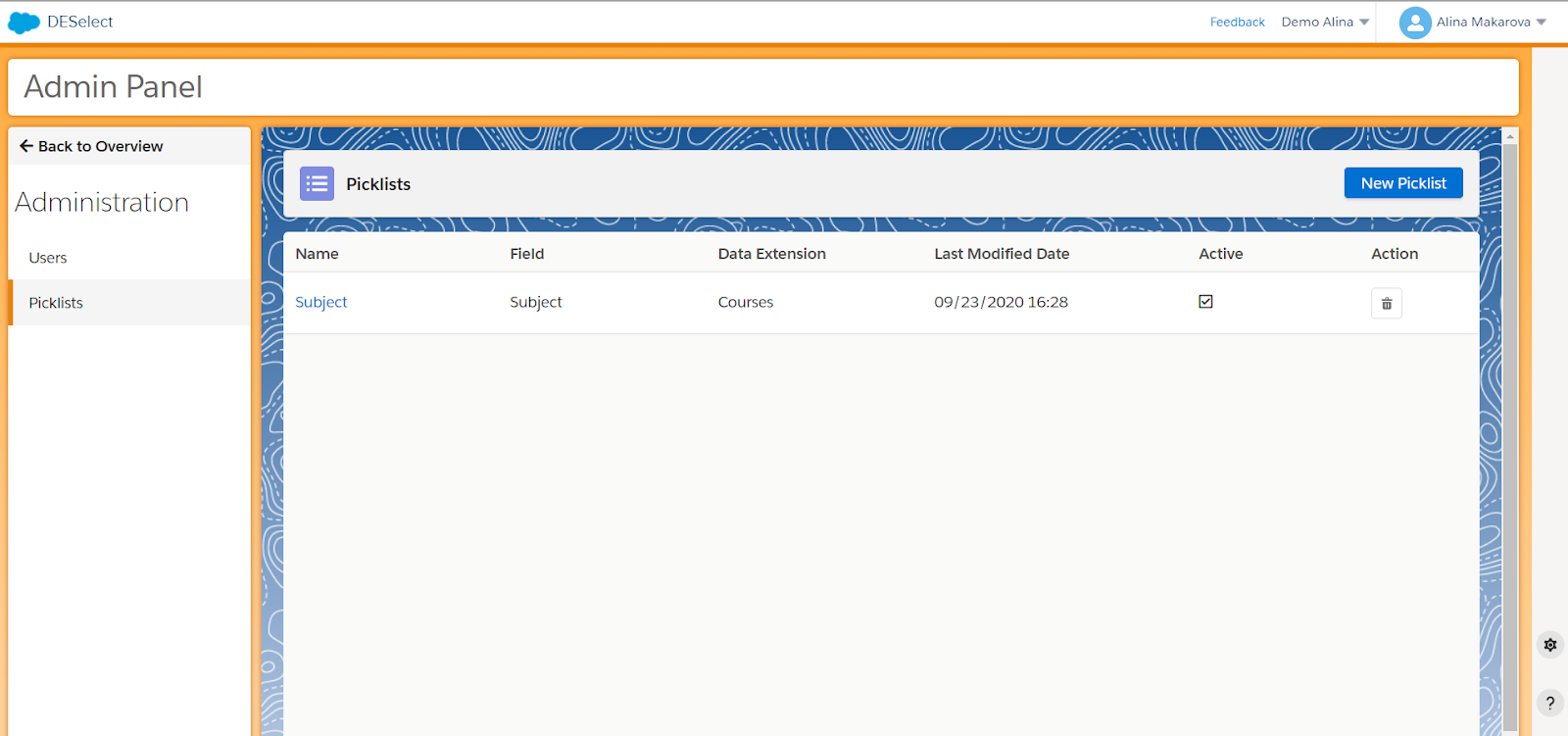
Then you will be redirected to the admin panel of DESelect, where you have to click on ‘Picklists’ in the left menu.

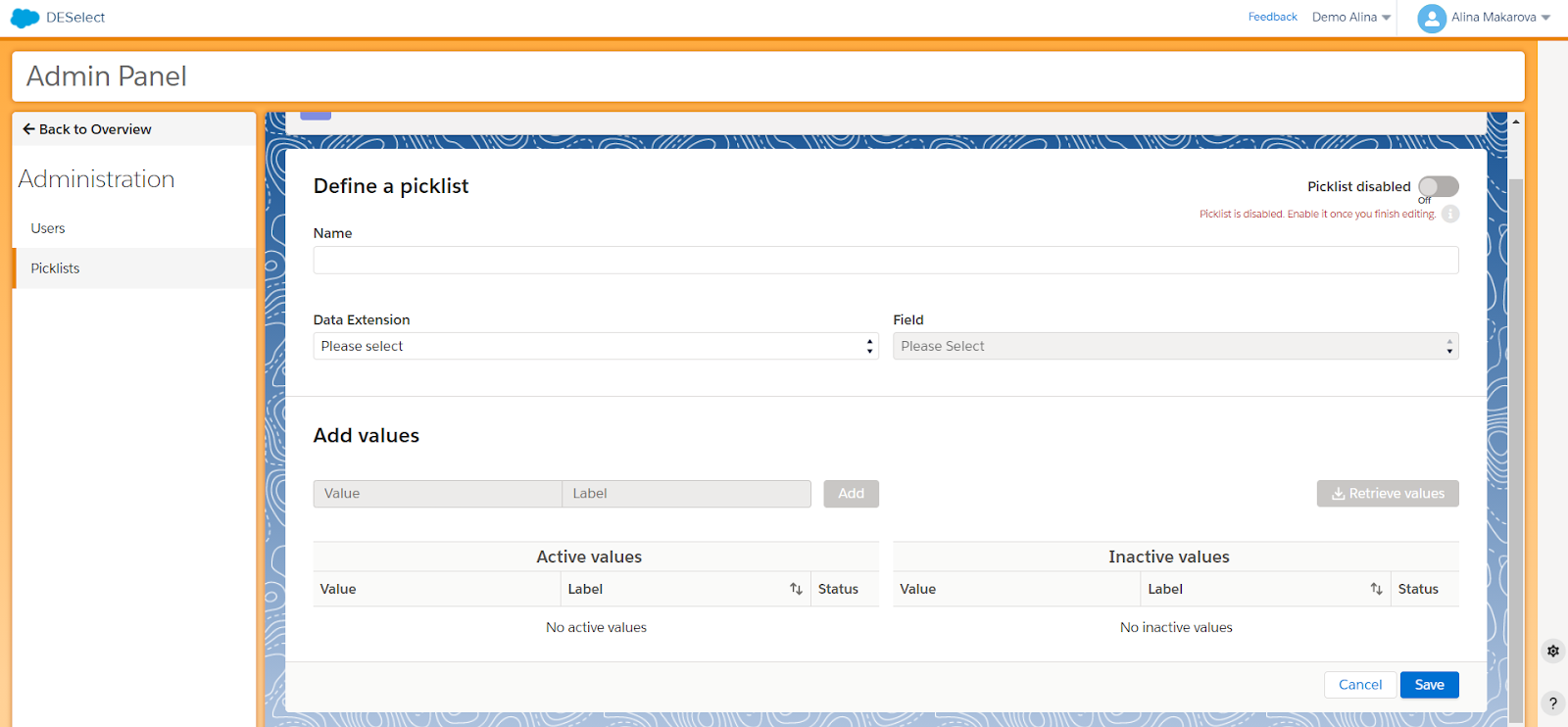
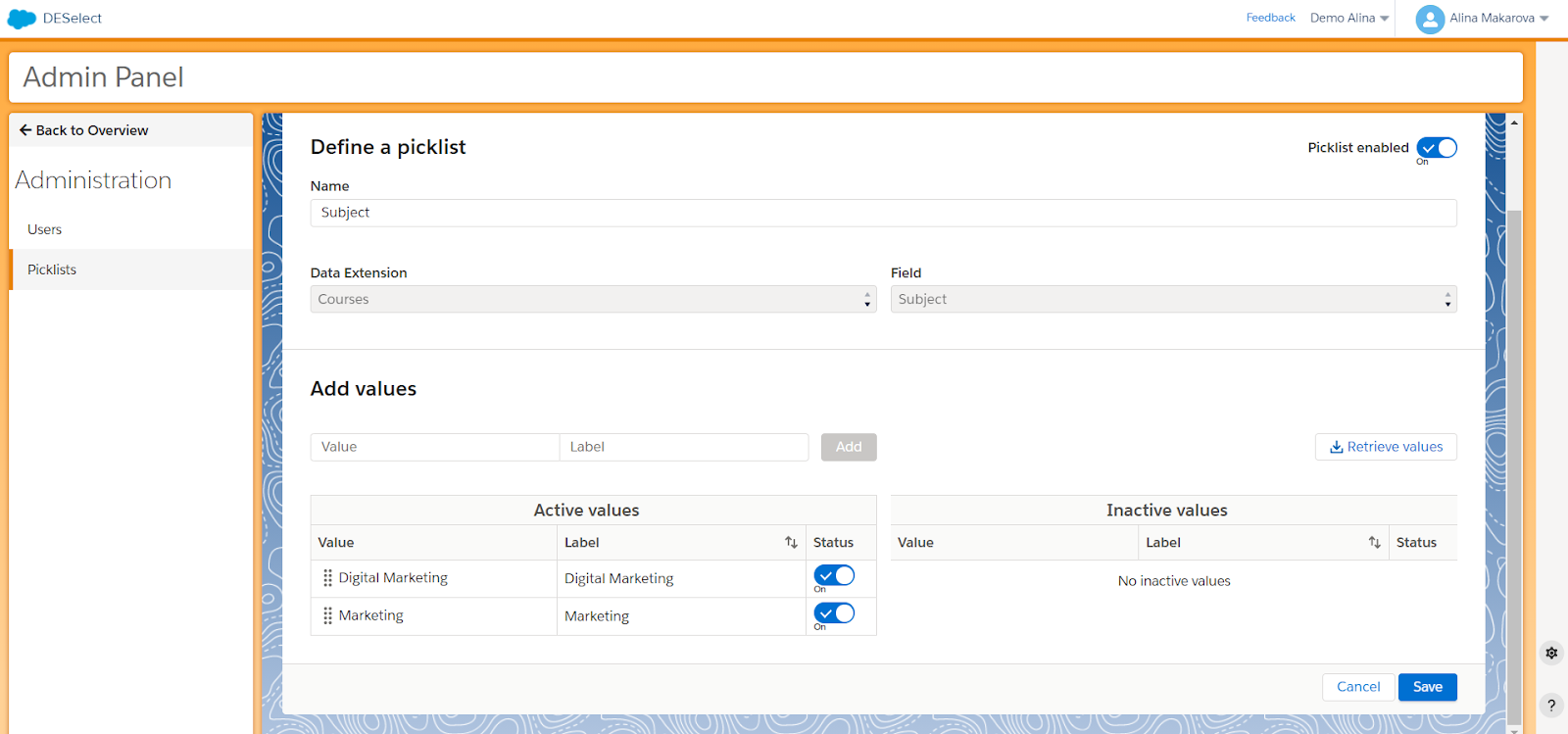
Next, click on ‘New Picklist’ and you’ll see the following screen:

Here you can give a unique name for your picklist first. Then choose the data extension that you will use to create a picklist value. Then you select a field. In our example, we choose the Courses data extension and the field that we will use for our picklist is going to be Subject.

On the right side of the menu, you can see the option “retrieve values”, by clicking on it, the values that match the field Subject will appear in the values table below. As you can see in our example, we have only two values both of which we would like to set as active and use in our further segmentation activities.

After you define the picklist values you can click to enable the picklist in the top right corner of the screen.

You have created a picklist, but how can you actually use it for your segmentation purposes in Salesforce Marketing Cloud?

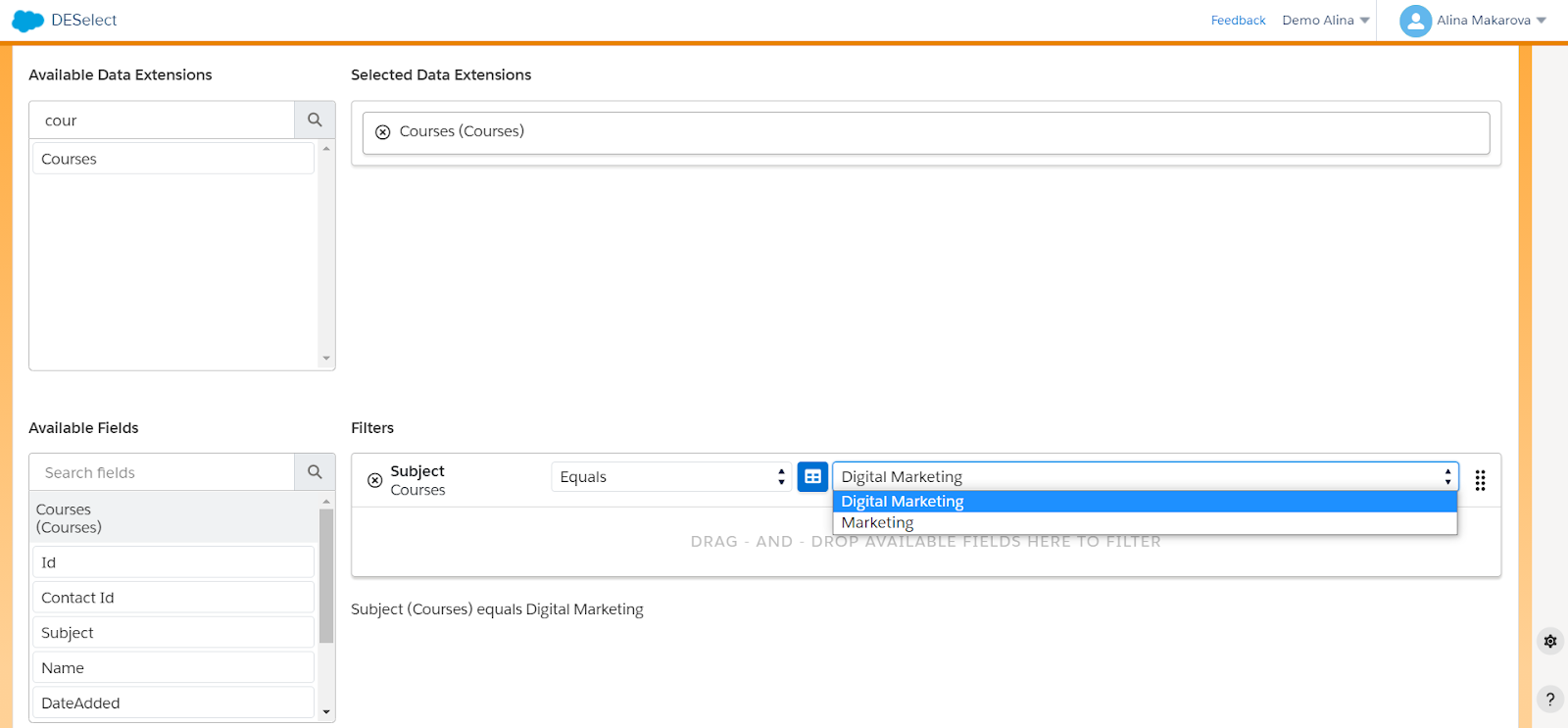
In DESelect, when you create a new selection using the data extension for which you created a picklist, you will see the following screen.

Voilà! That’s how easy it is to create a picklist for Salesforce Marketing Cloud using DESelect, which will allow you to streamline your segmentation processes and provide you with a more agile data model.

To wrap up

The opportunity to create picklists for your data extensions can be really beneficial for your data model in Salesforce Marketing Cloud. Not only does it help to standardize it so it’s clear and clean for the marketers but picklists also help to minimize the number of manual mistakes that can impact marketers’ work. Picklists also save time on segmentation that can help marketers create campaigns faster and in a more coherent manner.

Latest Articles

  • What Is Salesforce Sales Cloud? (And How It Really Works in 2026)

    What Is Salesforce Sales Cloud? (And How It Really Works in 2026) Salesforce Sales Cloud is Salesforce’s flagship CRM platform for managing the entire sales process from tracking leads and contacts through to closing deals and forecasting revenue. At its core, it’s a cloud-based system that brings together Leads, Accounts, Contacts, Opportunities, Activities, and AI-driven […]
  • WhoId and WhatId in Salesforce: Clear Definitions, Examples and SOQL Usage

    WhoId and WhatId in Salesforce: Clear Definitions, Examples and SOQL Usage If you have ever wondered why a Task you created does not appear where you expected it in Salesforce, the answer often comes down to two small fields: WhoId and WhatId. These fields play a crucial role in linking activities to the correct records, […]
  • Salesforce Backup Solutions: Why They Matter, How They Work, And What To Choose

    Salesforce Backup Solutions: Why They Matter, How They Work, And What To Choose Introduction: “Salesforce Already Backs Up My Data… Don’t They?” One of the most common assumptions we hear from businesses using Salesforce is that their data is automatically protected. After all, Salesforce is a massive enterprise platform trusted by millions of organisations worldwide. […]
  • Salesforce Health Cloud Explained: Managing Patient Data at Scale

    Salesforce Health Cloud Explained: Managing Patient Data at Scale Managing patient data across fragmented systems is one of the most persistent challenges facing healthcare providers today. Electronic health records sit in silos. Claims data lives in separate platforms. Patient engagement happens through disconnected channels. The result is a fractured view of the patient that undermines […]

Join our newsletter to receive updates and helpful SFMC guides.

Reach the most targeted
audiences in half the time