This is the second part of a 3-part series on segmentation in Salesforce Marketing Cloud (SFMC):
- Read the first part here: How to filter a data extension in Salesforce Marketing Cloud using filters (SFMC segmentation – part 1/3)
- Read the third part here: How to segment Data Extensions in Salesforce Marketing Cloud using DESelect (SFMC segmentation – part 3/3)
If you want to create a campaign in Salesforce Marketing Cloud (SFMC) that sets you apart, there is a big chance you’ll need to face a complex segmentation process. One of the solutions that SFMC proposes is SQL, Structured Query Language, which is quite an advanced method of segmenting. The creation of queries in SFMC offers a possibility to filter the information in DEs and target in a more sophisticated way.
In short, a query is an activity of getting relevant information from one or multiple data extensions and saving it to a target data extension. The process of SQL query creation is a task that requires some level of experience and time. Moreover, the process of a query activity execution in the SFMC environment can take up to 30 minutes – though this would be the case only for very complex queries.
A 3-step guide to segmenting data in SFMC using SQL queries
Step 1. Create a Data Extension
You need to create a target data extension, which you would like to use for your future campaign. For instance, the data extension below contains four fields that need to be populated with specific information from other data extensions:
Step 2. Create a SQL Query
In order to create a SQL Query, you should follow the steps below:
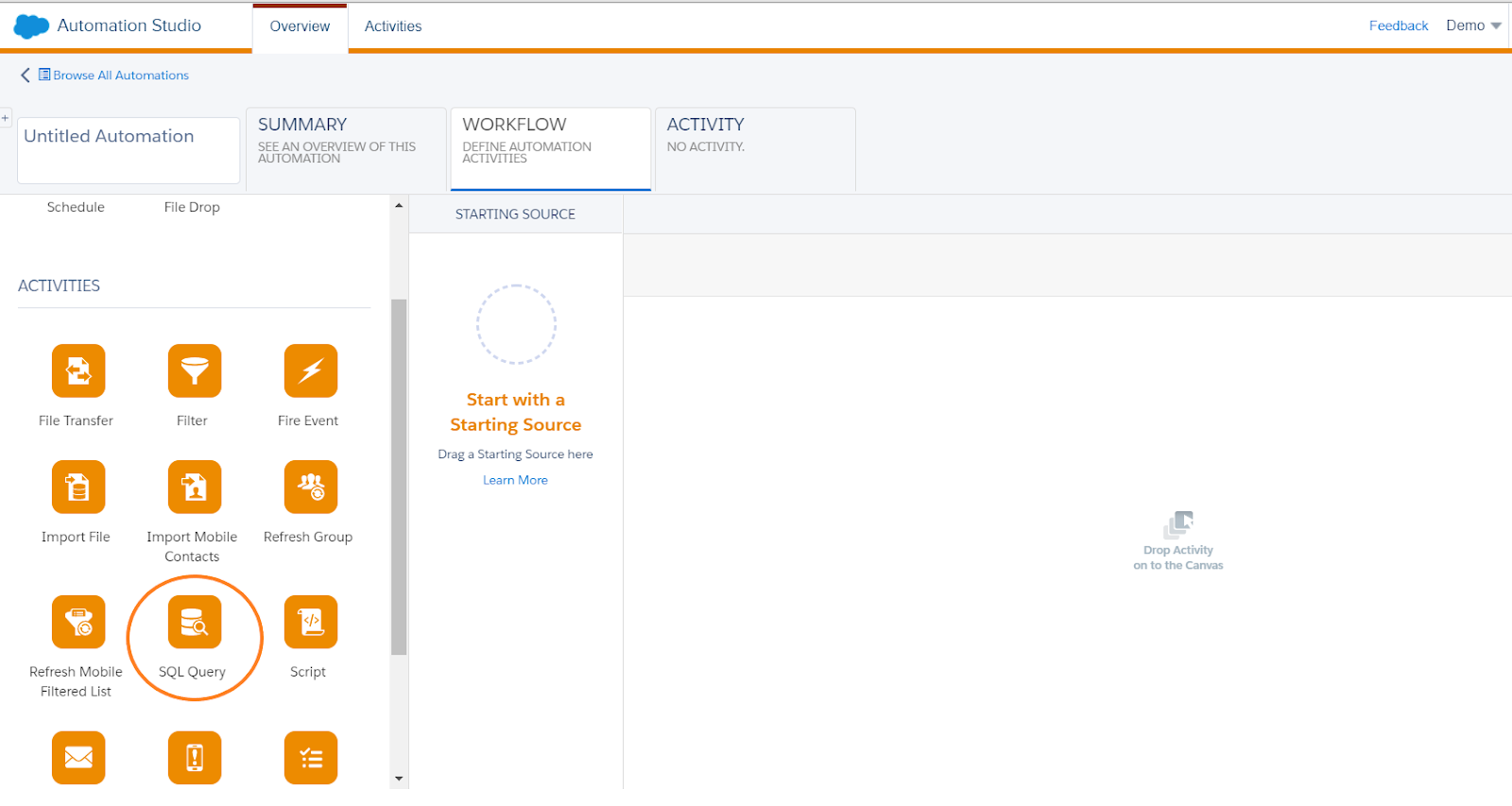
- Go to ‘Journey Builder’
- Click on ‘Automation Studio’
- Go to ‘Activities’ and click on ‘Create Activity’
- Choose ‘SQL Query’ from the options
Now you can start writing a SQL query:
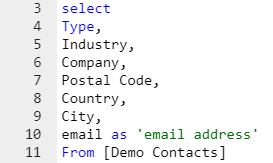
- use ‘select’ from where you choose the field names you would like to define
Note: They have to be separated by a comma except for the last field.
- choose ‘from’, where you define from which DE you are extracting the data
- validate syntax to check for the mistakes in the query
Note: Only selected fields that exactly match the name of the columns in your target DE will be populated.
How can you create a (slightly) more advanced SQL queries in SFMC?
SQL queries can be very advanced to fulfill all the requirements of a specific campaign. There are many possibilities to adapt the query to your needs.
For instance:
- You can rename fields using ‘as’. (e.g. your initial DE contains a field ‘email’ but your target DE ‘email address’)
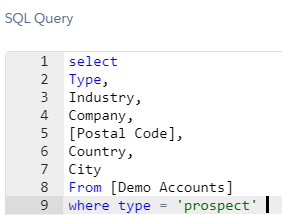
- Use ‘where’ to indicate you will specify criteria. (e.g. you have a field with a type of a company and you would like to filter only on the ‘prospect’ type)
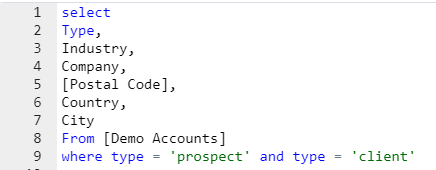
- You can combine criteria using ‘and’, ‘or’ and ‘not’ (e.g. you would like to filter not only on the ‘prospect’ companies but also on the ones who are classified as ‘clients’ in the ‘type’ field).
Do you want to know how to filter on data in DE’s in SFMC without SQL? Read our previous article on how to filter on data using data filters in SFMC!
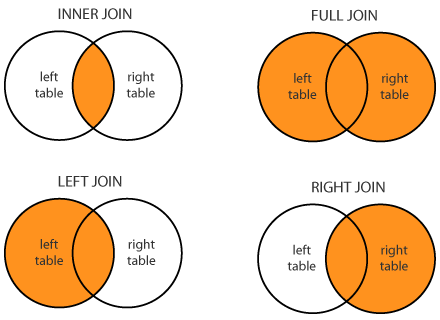
For creating even more advanced segmentation, you can also use joins. The ‘join’ clause is used for combining data from multiple DEs. Here are four different kinds of joins:
- (Inner) join: Returns records that have matching values in both tables
- Left (outer) join: Return all records from the left table, and the matched records from the right table
- Right (outer) join: Return all records from the right table, and the matched records from the left table
- Full (outer) join: Return all records when there is a match in either left or right table
Note: The ‘on’ clause is used to describe how the DEs are related to each other, usually based on an ID or sometimes an Email Address.
Don’t want to bother with joins and writing SQL queries manually? You can also create advanced segments with simple drag-and-drop, using DESelect.
Step 3. Target Data Extension
After your query is finished and it is validated you can move on to the next step. Here, you need to find your target data extension, which you want to populate with the query. Then decide how you want to add the data:
- Appending data means adding new data to target data extension
- Updating the data means matching data when it is found or adding new data if there is none
- Overwriting means replacing or overwriting the current data in the target data extension
Should you use SQL queries in Salesforce Marketing Cloud?
If you want to do more advanced segmentation on data extensions in SFMC then SQL queries can be an option for you. They allow a lot of freedom and can cover very specific needs. However, it also means that you need to have sufficient technical skills to write those queries. Otherwise, you would need to ask for the help of more technical colleagues (e.g. those in the IT department), which slows down the process of campaign creation or consider a drag-and-drop alternative like DESelect.
- A 3-step guide to segmenting data in SFMC using SQL queries
- How can you create a (slightly) more advanced SQL queries in SFMC?
- Should you use SQL queries in Salesforce Marketing Cloud?
Latest Articles
-
What Is Salesforce Sales Cloud? (And How It Really Works in 2026)
What Is Salesforce Sales Cloud? (And How It Really Works in 2026) Salesforce Sales Cloud is Salesforce’s flagship CRM platform for managing the entire sales process from tracking leads and contacts through to closing deals and forecasting revenue. At its core, it’s a cloud-based system that brings together Leads, Accounts, Contacts, Opportunities, Activities, and AI-driven […]March 3, 2026WhoId and WhatId in Salesforce: Clear Definitions, Examples and SOQL Usage
WhoId and WhatId in Salesforce: Clear Definitions, Examples and SOQL Usage If you have ever wondered why a Task you created does not appear where you expected it in Salesforce, the answer often comes down to two small fields: WhoId and WhatId. These fields play a crucial role in linking activities to the correct records, […]March 3, 2026Salesforce Backup Solutions: Why They Matter, How They Work, And What To Choose
Salesforce Backup Solutions: Why They Matter, How They Work, And What To Choose Introduction: “Salesforce Already Backs Up My Data… Don’t They?” One of the most common assumptions we hear from businesses using Salesforce is that their data is automatically protected. After all, Salesforce is a massive enterprise platform trusted by millions of organisations worldwide. […]March 3, 2026Salesforce Health Cloud Explained: Managing Patient Data at Scale
Salesforce Health Cloud Explained: Managing Patient Data at Scale Managing patient data across fragmented systems is one of the most persistent challenges facing healthcare providers today. Electronic health records sit in silos. Claims data lives in separate platforms. Patient engagement happens through disconnected channels. The result is a fractured view of the patient that undermines […]January 30, 2026Join our newsletter to receive updates and helpful SFMC guides.